Skip to content
  • Categories
  • Recent
  • Tags
  • Popular
  • World
  • Users
  • Groups
Skins
  • Light
  • Brite
  • Cerulean
  • Cosmo
  • Flatly
  • Journal
  • Litera
  • Lumen
  • Lux
  • Materia
  • Minty
  • Morph
  • Pulse
  • Sandstone
  • Simplex
  • Sketchy
  • Spacelab
  • United
  • Yeti
  • Zephyr
  • Dark
  • Cyborg
  • Darkly
  • Quartz
  • Slate
  • Solar
  • Superhero
  • Vapor

  • Default (No Skin)
  • No Skin
Collapse

Avoracloud Community

administrators

Private

Posts


  • Security Advisory: Linux Kernel Local Privilege Escalation "ssh-keysign-pwn" (‌CVE-2026-46333)
    D dawn

    Description

    A vulnerability was found in the Linux kernel that allows an unprivileged local user to read sensitive files normally restricted to the root user. The flaw occurs during process exit, where a brief window allows an attacker to intercept file access from a privileged process before it fully terminates. Successful exploitation may lead to the disclosure of sensitive data such as SSH host private keys or /etc/shadow contents.

    This is an Important flaw in the Linux kernel that allows a local unprivileged attacker to read root-owned files. This could lead to unauthorized access to sensitive information on affected Red Hat mainstream Linux systems.

    Affected Products

    Common Linux distributions, such as Red Hat, Debian, and Ubuntu.

    Mitigation

    Qualys has confirmed a simple mitigation: tightening Yama’s ptrace_scope. Setting it to 2 (admin-only attach) or 3 (no attach) blocks every public exploit we are aware of:

    sudo sysctl -w kernel.yama.ptrace_scope=3
    echo 'kernel.yama.ptrace_scope = 3' | sudo tee /etc/sysctl.d/99-ssh-keysign-pwn.conf
    

    ptrace_scope=3 disables ptrace attach entirely, which can break debuggers (gdb attaching to a running process, strace -p, etc.). If you need ptrace for local debugging on the affected box, use 2 instead, which restricts attach to admins. Either value blocks the known PoCs because they rely on pidfd_getfd(2)’s access check, which routes through __ptrace_may_access().

    This is a workaround, not a fix. Other paths to the same bug may exist. Install the patched kernel and reboot when you can.

    References

    https://access.redhat.com/security/cve/cve-2026-46333
    https://security-tracker.debian.org/tracker/CVE-2026-46333
    https://almalinux.org/blog/2026-05-15-ssh-keysign-pwn-cve-2026-46333/

    Announcements | 公告

  • Security Advisory: Linux Kernel Local Privilege Escalation (‌CVE-2026-43284‌, ‌CVE-2026-43500‌, CVE-2026-46300)
    D dawn

    Description

    "Dirty Frag" (also referred to as "Copy Fail 2") is a set of deterministic Linux kernel local privilege escalation vulnerabilities stemming from unsafe in-place cryptographic processing of shared skb fragments that reference file-backed page-cache pages in the xfrm-ESP (IPsec ESP) and RxRPC paths, belonging to the same broader bug class as Dirty Pipe and Copy Fail. A low-privileged local attacker can abuse zero-copy/splice mechanisms to manipulate the kernel page cache, overwrite privileged files such as /usr/bin/su or /etc/passwd, and gain root access.

    The collection comprises two distinct issues with assigned CVEs: the IPsec ESP flaw (involving the esp4 and esp6 modules, commonly used for VPNs and site-to-site tunnels) tracked as CVE-2026-43284, and the RxRPC flaw (which underpins the AFS distributed filesystem) tracked as CVE-2026-43500, both rated as "Important". Exploitation conditions differ—the ESP variant typically requires unprivileged user/network namespace creation, while the RxRPC variant depends on the rxrpc module being loaded or enabled (e.g., on Ubuntu), together providing broad exploitability across major Linux distributions. Until upstream patches are fully merged and deployed, mitigation involves disabling the vulnerable kernel modules (esp4, esp6, rxrpc) and applying appropriate kernel configuration to further reduce the attack surface.

    CVE-2026-46300: "Fragnesia" is a variant of Dirty Frag vulnerability in the ESP/XFRM leading to Local Privilege Escalation (LPE) vulnerability in the Linux.

    Affected Products

    CentOS/RHEL 8,9,10
    Debian

    Mitigation

    Overall Guidance

    Any hardening measures that limit local access help reduce the risk of exploitation. Examples include disabling SSH, ensuring SELinux is in enforcing mode, using the default Security Context Constraints (SCC), running workloads as non-root, and restricting oc debug access to trusted cluster administrators. This list is not exhaustive, and the applicability of each measure should be evaluated in the context of your operational requirements and security policies. Additionally, disabling any single access method does not eliminate all other means by which a user could gain local access.

    Determining if IPsec is in use

    lsmod | grep -E 'esp4|esp6'
    

    If the modules are not loaded, IPsec is not in active use and the blocklist is safe to apply. If the modules are loaded and IPsec is actively configured, the blocklist will prevent IPsec from functioning after the next reboot. In that case, consider the "No Impact to IPsec Method" below. Note that even if the modules are loaded, rmmod will refuse to unload them if they are in active use. No running IPsec connections will be disrupted by the command itself.

    Blocklist Method

    Warning: Blocklisting esp4/esp6 will break IPsec functionality. Blocklisting rxrpc will break AFS client connectivity. Evaluate the impact on your environment before applying.

    printf 'install esp4 /bin/false\ninstall esp6 /bin/false\ninstall rxrpc /bin/false\n' > /etc/modprobe.d/dirtyfrag.conf
    rmmod esp4 esp6 rxrpc 2>/dev/null; true
    

    No Impact to IPsec Method

    Alternatively, for environments where IPsec must remain functional, the ESP variant (CVE-2026-43284) can be blocked by disabling unprivileged user namespaces:

    Warning: This only blocks the ESP variant. On RHEL 9 and 10, the rxrpc variant (CVE-2026-43500) remains exploitable unless rxrpc is also blocklisted as shown above. Disabling unprivileged user namespaces may also affect rootless containers, sandboxed browsers, and Flatpak.

    echo "user.max_user_namespaces=0" > /etc/sysctl.d/dirtyfrag.conf
    sysctl --system
    

    Reverse Mitigation

    remove /etc/modprobe.d/dirtyfrag.conf

    References

    https://access.redhat.com/security/cve/cve-2026-43284
    https://security-tracker.debian.org/tracker/CVE-2026-43284
    https://security-tracker.debian.org/tracker/CVE-2026-46300
    Announcements | 公告

  • Security Advisory: Linux Kernel Local Privilege Escalation (CVE-2026-31431)
    D dawn

    Description

    A flaw was found in the Linux kernel's algif_aead cryptographic algorithm interface. An incorrect 'in-place operation' was introduced, where the source and destination data mappings were different. This could lead to unexpected behavior or data integrity issues during cryptographic operations, potentially impacting the reliability of encrypted communications.

    This local privilege escalation is rated as Important severity. Part of the Linux kernel's cryptographic interface contains an incorrect in-place operation, where source and destination data mappings differ. This could lead to data integrity issues, including the escalation to root privileges.

    Affected Products

    • RHEL/CentOS/Rocky Linux/AlmaLinux 8, 9, 10 (Fixed)
    • openEuler 20.03 LTS and later versions (Fixed)

    Mitigation (for RHEL/CentOS)

    Warning: there may be performance impacts for modifying functionality that uses kernel cryptographic functions.

    1. Run below command to append the option to grub:
    # grubby --update-kernel=ALL --args='initcall_blacklist=algif_aead_init'
    
    1. Restart the system:
    # reboot
    
    1. Verification: once rebooted, verify the parameter:
    # cat /proc/cmdline | grep initcall_blacklist
    BOOT_IMAGE=(hd0,gpt2)/vmlinuz<...> initcall_blacklist=algif_aead_init
    

    Reverse Mitigation

    Once the fixed kernel is available and installed to reverse the mitigation see steps below:

    1. Run below command to remove the option to grub:
    # grubby --update-kernel=ALL --remove-args='initcall_blacklist=algif_aead_init'
    
    1. Restart the system:
    # reboot
    
    1. Verification: once rebooted, verify the parameter has been removed:
    # cat /proc/cmdline | grep initcall_blacklist
    <... no output ...>
    

    References

    https://access.redhat.com/security/cve/cve-2026-31431

    Announcements | 公告

  • Changing the Windows Display Language via User Data During Instance Launch
    D dawn

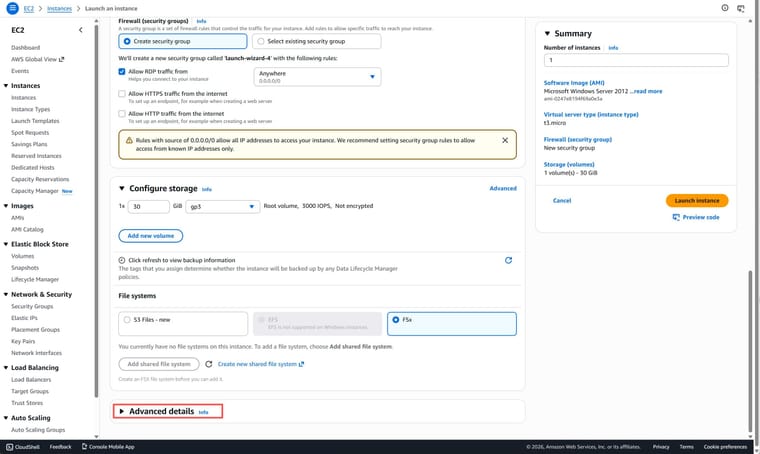
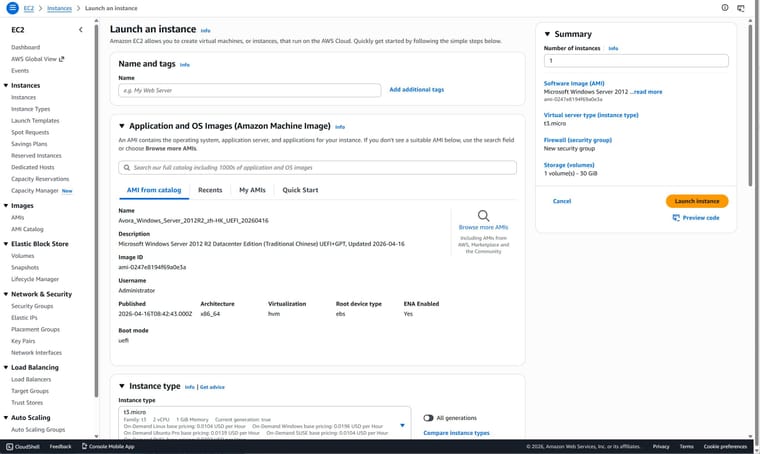
    We have successfully released Chinese-language AMI images for Windows Server 2012 R2, 2016, 2019, 2022, and 2025 on AWS. The default display language for these AMIs is Chinese, but you can change the operating system's display language to English (United States) via user data during the initial instance boot process.

    AVORA TECHNOLOGY strictly adheres to relevant specifications when integrating language packs into Windows AMIs, and this typically does not cause any adverse effects. However, considering that the primary audience for this product consists of Chinese users, we do not rule out the possibility of removing the English language pack in future version updates to reduce the size of the AMI images.

    Instructions:

    1. Expand the "Advanced details" option at the bottom of the "Launch an instance" wizard;
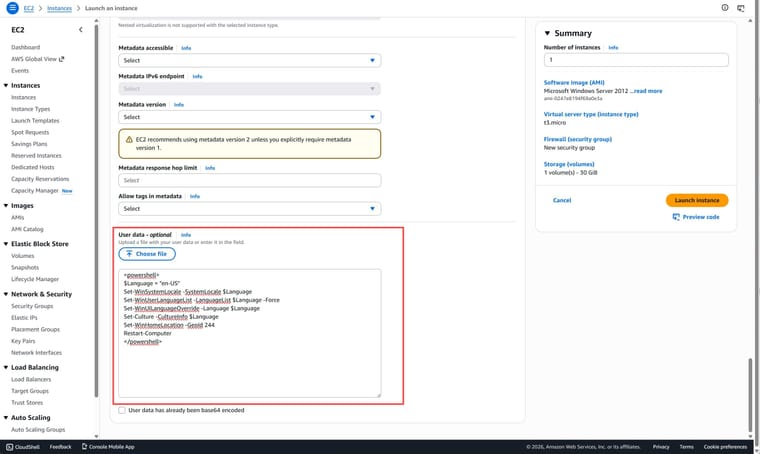
    2. Then, in the "User data - optional" section at the very bottom of the page, enter the following content (do not check the "User data has already been base64 encoded" box):
    <powershell>
    $Language = "en-US"
    Set-WinSystemLocale -SystemLocale $Language
    Set-WinUserLanguageList -LanguageList $Language -Force
    Set-WinUILanguageOverride -Language $Language
    Set-Culture -CultureInfo $Language
    Set-WinHomeLocation -GeoId 244
    Restart-Computer
    </powershell>
    
    1. Proceed to launch the instance as usual. Since this change involves an additional reboot step, the initial startup time of the instance will be slightly longer.

    e2567e56-ebf4-43ed-ba12-e21daa94f259-image.jpeg

    157849a0-8735-4b25-bf2e-803fb33695fa-image.jpeg

    8fd71785-9be3-4f5b-970f-7010f924f7fe-image.jpeg

    Tutorials & Guides | 教程指南

  • Welcome to your NodeBB!
    D dawn

    Welcome to your brand new NodeBB forum!

    This is what a topic and post looks like. As an administrator, you can edit the post's title and content.
    To customise your forum, go to the Administrator Control Panel. You can modify all aspects of your forum there, including installation of third-party plugins.

    Additional Resources

    • NodeBB Documentation
    • Community Support Forum
    • Project repository
    General Discussion | 划水摸鱼

Member List

D dawn
  • Login

  • Don't have an account? Register

  • Login or register to search.
Powered by NodeBB Contributors
  • First post
    Last post
0
  • Categories
  • Recent
  • Tags
  • Popular
  • World
  • Users
  • Groups